
Know which clients need attention. Across your entire practice.
CTAX Intelligence continuously organizes IRS data across your monitored client book, so you can prepare more accurately, find new service opportunities, and reach out before clients have to call.
The IRS gives you records. It doesn't give you a practice view.
IRS tools make you retrieve and review taxpayers one at a time — hold music, ID.me walk-throughs, six clicks per transcript, scattered PDFs. CTAX Intelligence brings monitored clients into one organized system and lets you filter the whole population for the exact issue or opportunity you're looking for.
How it works today
- Calling the IRS and waiting on hold — or getting the high-call-volume message
- Walking clients through ID.me, especially older clients who struggle with phones and cameras
- Clicking transcript by transcript through e-services
- One person in the office with e-services access
- Relying on the client's memory for prior years and forgotten income
With CTAX Intelligence
- One monitored book, filtered by the activity you care about
- Records refresh automatically each week
- Any single client refreshed on demand, updated within minutes
- History retained even after the IRS availability window closes
- Your whole team working from the same organized record
Find every client affected by the same IRS event — in seconds.
Filter your monitored client population by notices, extensions, missing returns, estimated payments, refunds, assessments, and authorization status. Instead of searching client by client, start with the action your practice wants to take.
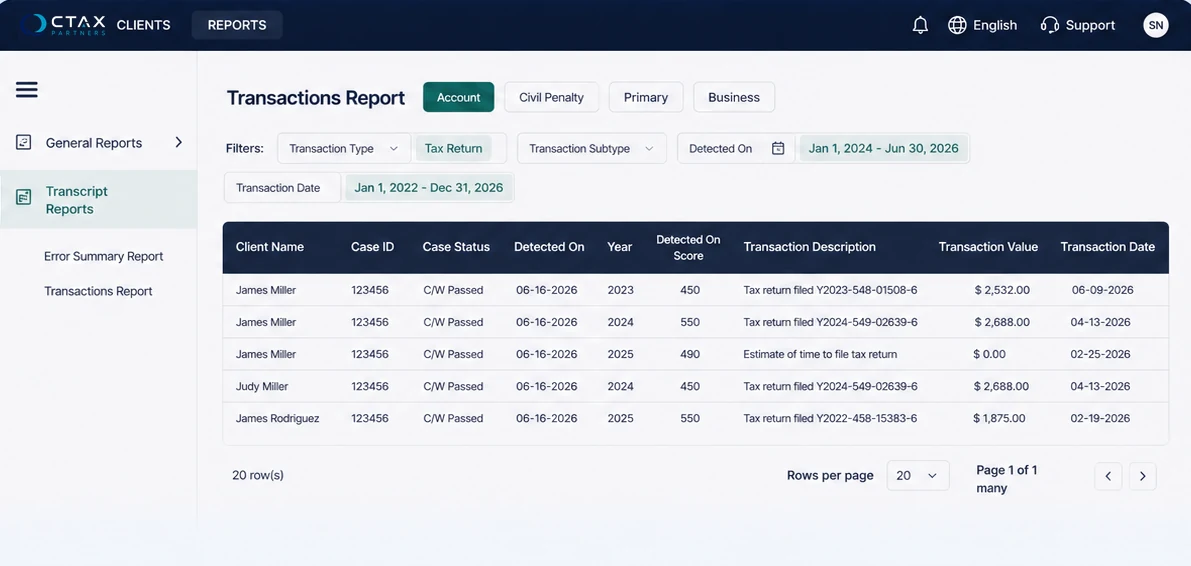
The report this is modelled on. Filter the whole monitored population, then work the list that comes back. Product screenshot; client data is illustrative.
Your client data already contains the next service opportunity.
None of these depend on a client owing the IRS money. They are ordinary preparation, advisory, and compliance work you are already qualified to do — surfaced by activity you can see across the whole book.
Extension recovery
Find clients whose extension was filed but whose return hasn't posted — and book them before the deadline.
Missed-income prevention
Verify W-2 and 1099 activity so forgotten side income doesn't become next year's notice.
Second-look reviews
Compare prior-preparer returns against IRS data and offer an amendment when value remains.
Nonfiler intake
Pull the full history for a new client missing several years and scope catch-up work accurately.
Paid tax-health review
Offer a diagnostic review as a standalone paid service, creditable toward later preparation work. Some firms charge for a transcript review as a paid diagnostic.
Penalty relief
Identify likely first-time abatement eligibility before the client conversation.
Estimated-payment coaching
See who paid, who missed, and who needs a quarterly check-in.
Refund-status answers
Answer "where's my refund" from current IRS activity instead of another manual search.
Staff quality control
Compare newly prepared returns against transcript data — and use the gaps as training.
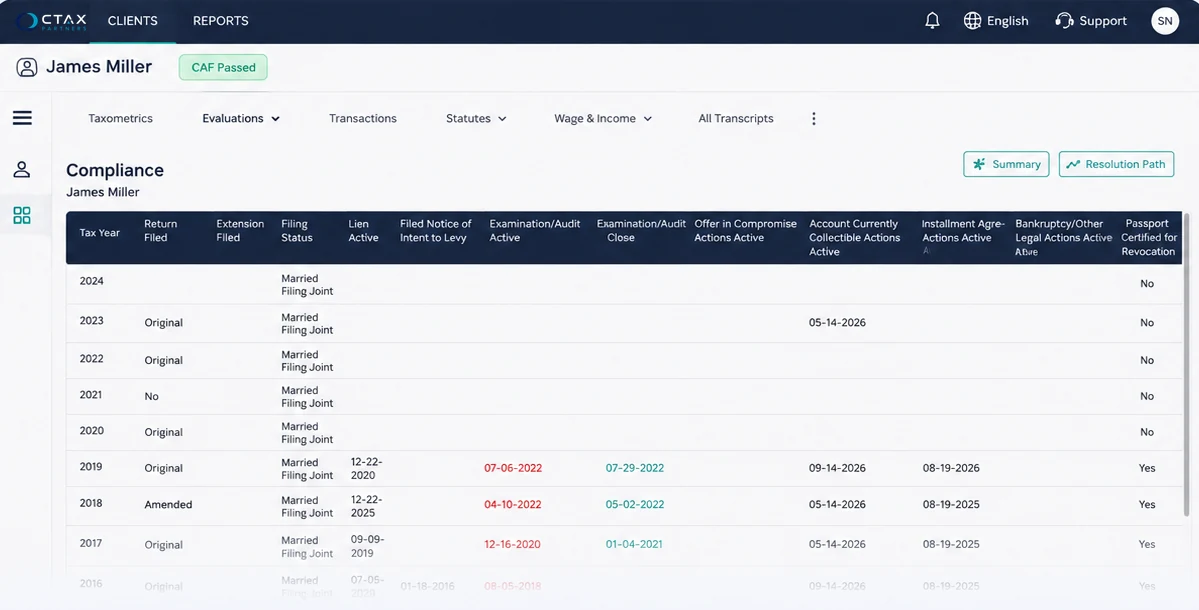
A year-by-year compliance view surfaces missing returns, amendments and abatement candidates without opening a single transcript. Product screenshot; client data is illustrative.
Start preparing before your clients walk in.
Once a client book is monitored, records update as new IRS transcript data becomes available. You can see which documents the IRS already has, which clients are ready for outreach, and what's still missing — before the appointment.
Know what's already reported
See the wage and income documents on file, so the intake conversation starts from evidence instead of memory.
Sort the ready from the waiting
Separate clients whose records look complete from the ones still missing documents, and sequence outreach accordingly.
Spread the workload
Start the work that can be started early, instead of discovering every gap in the same two weeks.
Pick what you want to get done. See what it looks like.
Every practice arrives with a different first job. Choose one and the report fills in with the clients it would surface.
Bring back extension clients
Clients whose extension was filed but whose return has not posted yet.
Go from the entire book to the complete client picture.
Open one client and see organized transcript archives, wage-and-income detail, return history, compliance status, balances, payments, penalties, filing statutes, transaction changes, spouses, ITIN history, and related business entities — in one record.
Payer detail you can actually read.
Transcripts pulled through self-service channels arrive with payer names and EINs masked — which means requesting unmasked copies by mail and waiting on them. CTAX Intelligence returns full payer and EIN detail, so you can see who reported what without a second request. No mail request, no waiting on an unmasked copy.
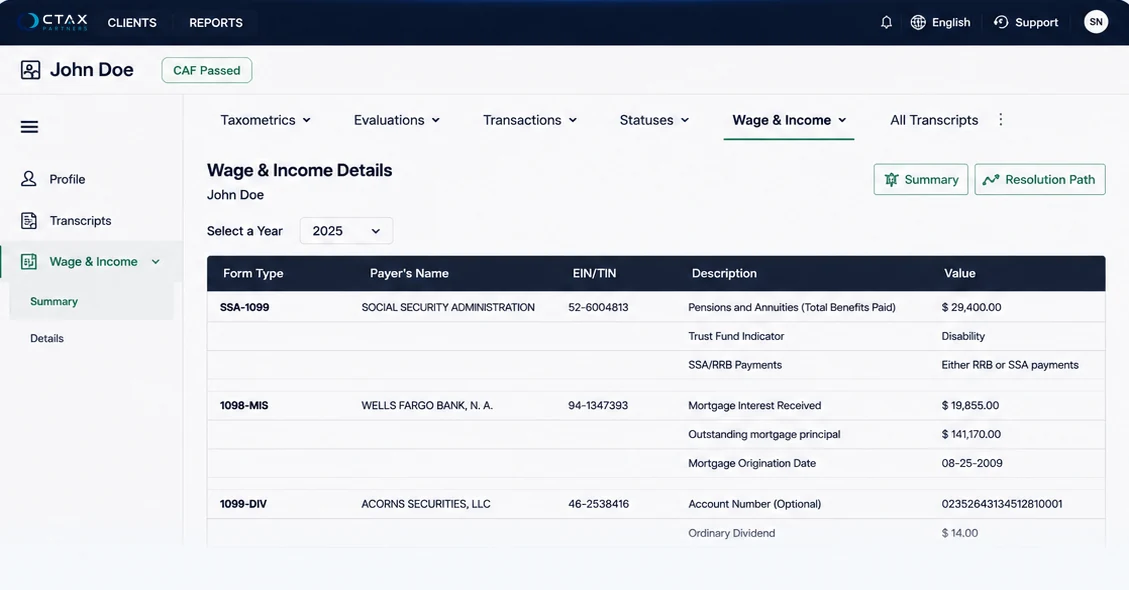
The EIN column, populated. Payer name and identification number arrive readable — no second request, no waiting on a mailed copy. Product screenshot; client data is illustrative.
A permanent archive
The IRS provides return transcripts for the last 3 years and wage-and-income transcripts for the last 10. Records already pulled are retained even after that window closes.
Joint and individual views
Switch between spouses without re-navigating or re-pulling.
Transaction change log
Evidence of when IRS codes appear, change, or disappear on the account.
Wage-and-income detail
Form-level, sortable by year or form type, and ready to carry into preparation.
Is this amendment still worth filing?
The amendment window evaluated for you, so the answer arrives before the client conversation.
Penalty abatement eligibility
Likely eligibility identified up front, rather than discovered halfway through a call.
Every taxpayer number in one record
Individual, spouse, joint, ITIN-to-SSN transitions, and related business EINs under one client record.
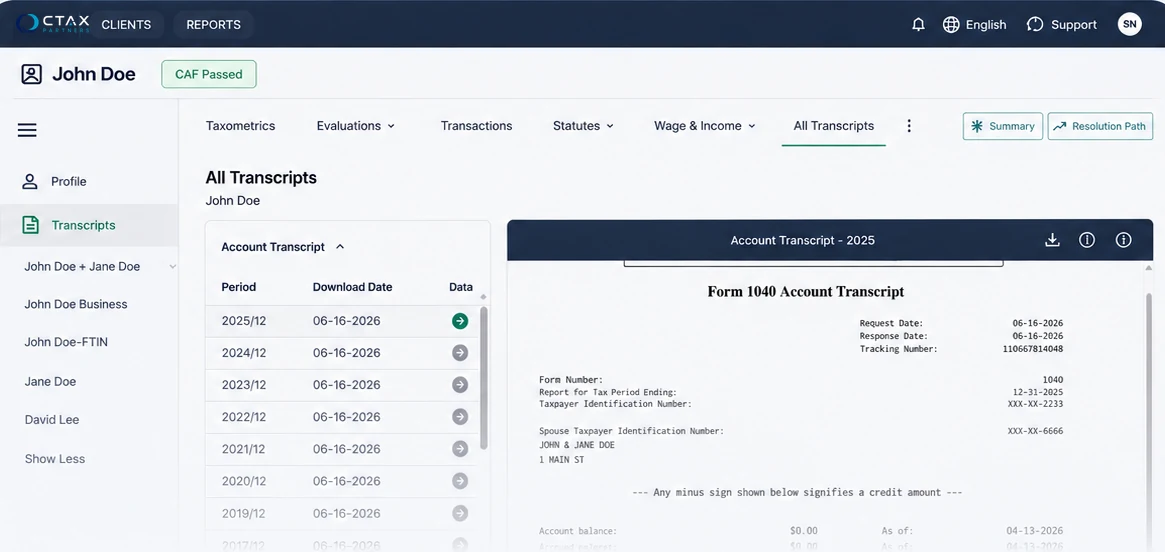
Every period retained and openable, with the spouse, business and ITIN records for the same client sitting alongside. Product screenshot; client data is illustrative.
What the IRS keeps, and what you keep
Three levels of access. Plainly labelled.
Partners consistently ask the same question: does this cover my referrals, or my whole book? Here is the honest answer, in the order it becomes available to you.
Clients you've already referred
Clients you referred to Community Tax who moved forward with the initial service. Authorization is already on file, so monitoring starts without any new paperwork.
Referred clients who didn't proceed
Qualifying balance-due clients who decline resolution can still be enrolled in monitoring, so you keep watching the account instead of losing sight of it.
Your broader or entire client book
Put clients you have never referred under authorization and monitoring — the whole-book reporting on this page, applied to your full practice.
Talk to us about licensingBuilt from real tax operations — not a generic dashboard concept.
CTAX Intelligence runs Community Tax's own transcript and case-management operations. Its evaluations are hard-coded tax-professional business rules applied to IRS records — AI is used only to summarize structured data, never to generate tax conclusions.
It ran a real book before it was ever sold to you.
CTAX Intelligence works against roughly 30,000 monitored taxpayers and about 15,000 active client cases at Community Tax. Every evaluation on this page was built for a working practice under real volume — not designed for a demo.
A direct line to the IRS, not a browser session.
Community Tax holds Application-to-Application (A2A) authorization — a machine-to-machine IRS connection available only to licensed tax professionals through an IRS approval process. It's why records refresh on a schedule instead of one login at a time.
The logic is tax rules, not a language model.
Compliance checks, penalty abatement eligibility, amendment windows, and statute evaluations are hard-coded business rules written by practicing tax professionals. One AI feature summarizes what's already in the record in plain language. It doesn't reach conclusions, and it doesn't touch the evaluations.
The same system we run our own operation on.
CTAX Intelligence isn't a partner-facing product tested somewhere else. It's the platform Community Tax uses to manage its own client base every day. Security controls are modeled on the SOC 2 framework, with formal certification audit underway.
Getting connected, with a person on the other end.
Authorization is the part that decides whether any of this works in your office. There are four paths, and onboarding covers whichever one fits how you actually operate.
The authorization is already on file
If a client already has an 8821 or 2848 recorded, records pull automatically once your CAF is linked. Nothing new to sign.
Paper 8821 signed in the office
Signed at the desk during an appointment, then uploaded or faxed.
Tax Pro Account, submitted online
Walks the client through ID.me and takes roughly two minutes. The CAF entry typically passes in a few business days.
Templated bulk upload
For existing client lists, so an established book doesn't have to be entered one taxpayer at a time.
IRS acceptance of electronically signed authorizations can vary by submission path. Onboarding covers the workflow that works for how your office actually operates.
What support actually includes
- Customized onboarding based on your firm's setup
- Resource material inside the partner portal
- Group and one-on-one training when your team needs it
- Continuing-education sessions
Start with a handful of real clients. Not a pilot, not a sandbox — a few accounts you already know well, so the reports mean something on day one and your staff learns on familiar ground.
Different practices, different first job.
Each of these came out of a working session with a practice of that shape — they picked the use case, we didn't hand it to them.
Single-office 1040 practices
Whole-book reporting instead of client-by-client checking. Start from the list of people worth calling, not from the client roster.
Raised by a single-office 1040 practice
Newer and growth-stage offices
Refund-status calls answered on the spot, extension clients recovered before the deadline, and missing documents caught before they force an amendment.
Raised by a newer office owner
Multi-office operators
Staff quality control against transcript data, visibility into referral outcomes, and a second-look pipeline that doesn't depend on anyone remembering to check.
Raised by a multi-office operator
Business and advisory practices
Readable payer and EIN detail, entity filing history, and abatement eligibility identified before the advisory conversation starts.
Raised by a business advisory practice
The questions partners actually ask.
I already know how to pull transcripts.
You're not paying for access. You're paying to act across the whole book at once, preserve history the IRS eventually drops, refresh without logging in, and stop reviewing one taxpayer at a time. The skill isn't the bottleneck — the retrieval is.
Most of my clients don't owe tax debt.
Then most of the value here is still yours. The primary use cases are preparation accuracy, extensions, refunds, missing returns, estimated payments, second looks, amendments, and advisory work. Resolution is one escalation path among many, not the point of the product.
Will this create more work?
It reduces retrieval and review, which is where the hours currently go. The reports exist to tell you where attention is worth spending — the output is a shorter list, not a longer one.
Do my clients need another portal?
No. The professional uses the intelligence. Nothing on this page depends on your clients logging into anything.
Is this just AI making tax recommendations?
No. Evaluations are hard-coded tax business rules written by practicing tax professionals. One AI feature summarizes existing transcript data in plain language — it does not generate tax conclusions, and it does not touch the evaluations.
Will Community Tax take over my client?
No. You stay the client's advisor. Community Tax handles only the specialist work you escalate. The client stays yours, the relationship stays yours, and CTAX Intelligence keeps you looking at the same IRS record we are — so you can see the account through the engagement and after it.
How do authorizations work?
Four supported paths, covered in onboarding: an existing 8821 or 2848 already on file, a paper 8821 signed in the office, Tax Pro Account submitted online, or a templated bulk upload for an existing client list. Existing authorizations make setup considerably faster.
What about businesses and spouses?
Individual, spouse, joint, ITIN-to-SSN transitions, and related business EINs sit under one client record — subject to what the IRS makes available.
Does it cover state tax authorities?
Federal IRS data only. State tax authorities do not offer equivalent access, so state withholding documents are still required from clients.
Is it secure?
It's the platform Community Tax runs its own client base on every day, connected to the IRS through Application-to-Application authorization. Security controls are modeled on the SOC 2 framework, with formal certification audit underway.
What does it cost?
Pricing is in development. Talk to us about your practice — client volume, how you handle transcripts today, what you'd want to find first — and we'll walk through options as they're finalized.
See what this looks like on your own client book.
A short working session with your practice in mind — your client volume, your current transcript workflow, and the outcomes you'd want to find first.
- We start from how your office handles transcripts today, not from a feature tour
- You'll see the whole-book reporting applied to a practice shaped like yours
- Straight answers on access, authorization, and what's still in development
Request a Demo
Nine short questions. They all exist so the person you meet already knows your setup.
Request received.
We have what we need to make the first conversation useful.
- 1Someone who works with practices your size reaches out to book a time.
- 2They'll have your transcript workflow and what you wanted to find first in front of them.
- 3The session runs against a practice shaped like yours — not a generic feature tour.